
Download 3D Solar System – free Windows education software for astronomy
Overview
3D Solar System is a lightweight, free Windows application designed for anyone who wants to explore the planets, moons, and other celestial bodies in an interactive three‑dimensional environment. Developed by Tingan, the program falls under the “Education & Reference” category with a subcategory focus on “Science,” making it an ideal companion for students, teachers, and astronomy enthusiasts alike. Since its addition to the software catalog in 2012, the app has accumulated over 13,000 downloads, a testament to its reliable performance and educational value.
The current version, 3.7, runs smoothly on Windows 95 and all later Windows releases, offering an English language interface that is both intuitive and visually appealing. While the software’s last catalog update was recorded on June 18, 2012, the core functionality remains relevant for modern learners who seek a no‑frills, resource‑efficient tool to visualize the solar system without the need for an internet connection. Whether you’re preparing a classroom demonstration, creating a home‑based planetarium, or simply satisfying personal curiosity about the cosmos, 3D Solar System delivers an engaging experience that blends scientific accuracy with easy‑to‑use navigation.
Its modest storage footprint ensures that even older machines with limited hard‑drive space can run the program without slowdown, making it a practical choice for schools with legacy hardware.
Key Features & Educational Value
- Accurate 3‑D rendering of all eight planets, dwarf planets, and major moons.
- Real‑time orbital motion that reflects each body's actual period and speed.
- Zoom and rotate controls for close‑up inspection of planetary surfaces.
- Labelled celestial objects with optional informational pop‑ups.
- Light‑weight installation package – requires less than 10 MB of disk space.
- Fully offline operation – no internet connection needed after download.
- Support for multiple view modes, including heliocentric and geocentric perspectives.
- Simple, menu‑driven interface suitable for users of all ages.
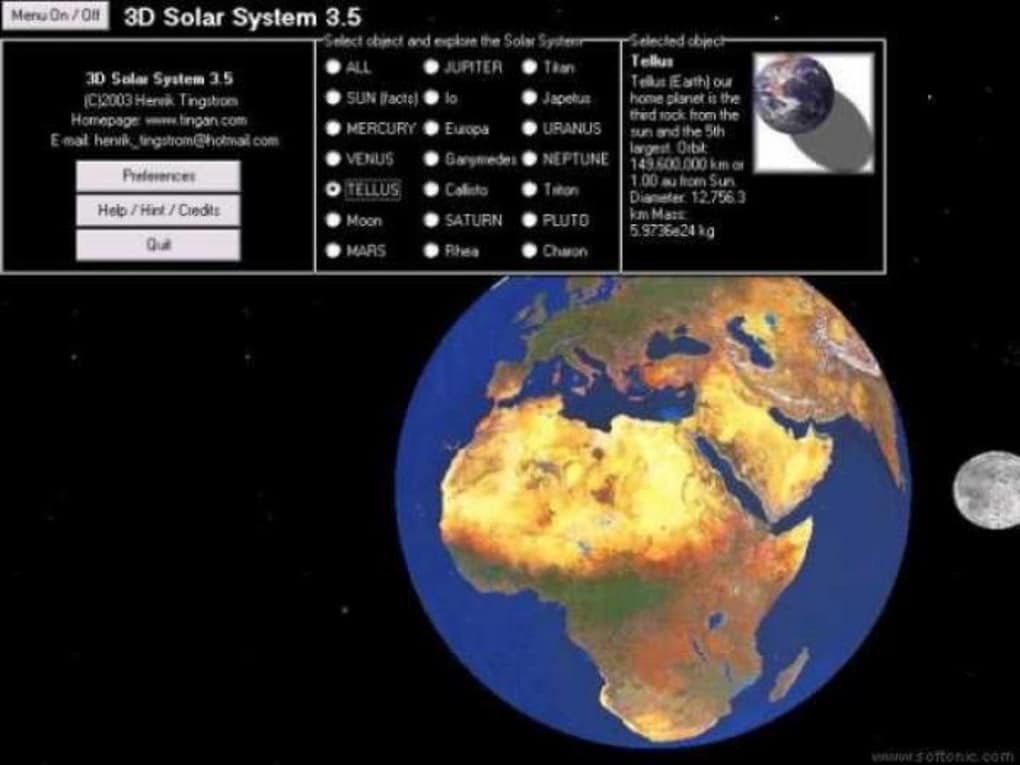
The educational strength of 3D Solar System lies in its ability to turn abstract astronomical data into a tangible visual experience. By watching planets orbit in real time, learners can better grasp concepts such as orbital periods, axial tilts, and relative distances. The optional pop‑up panels deliver concise scientific facts, including planet size, composition, and notable features like the Great Red Spot on Jupiter or Olympus Mons on Mars.
Teachers can use these panels as springboards for deeper discussion, while students can explore at their own pace, reinforcing classroom lessons with hands‑on interaction. Because the software runs on any Windows version from 95 onward, it is accessible in a wide range of educational settings, from modern labs to older computer rooms that cannot support resource‑intensive 3‑D simulators. The program’s minimal hardware demands also mean that it can be installed on multiple classroom computers without licensing concerns, as the app is completely free.
In short, 3D Solar System provides a solid blend of visual immersion and factual depth, making it a valuable supplement to any science curriculum.
Installation, Usage & Compatibility
Installing 3D Solar System is straightforward and can be completed in under five minutes, even on legacy systems. Follow these steps to get the app up and running:
- Visit the official download page and click the “Download” button for the Windows installer (the file is typically named
3DSolarSystem_v3.7.exe). - After the download completes, locate the installer in your
Downloadsfolder and double‑click to launch it. - Accept the End‑User License Agreement, then choose an installation directory (the default
C:\Program Files\3D Solar Systemworks well). - Click “Install” and wait for the progress bar to finish; the process takes only a few seconds because the package is under 10 MB.
- When prompted, select “Run 3D Solar System now” to launch the program, or simply find the shortcut on your desktop.
Once opened, the main window presents a central view of the Sun with the planets arranged in their current orbital positions. Use the mouse wheel to zoom in or out, and click‑drag to rotate the camera around the solar system. The toolbar at the top provides quick access to view modes (e.g., heliocentric vs. geocentric), toggling of informational labels, and a reset button to return to the default view. For educational sessions, the “Information” menu reveals detailed data panels for each object; these can be pinned or closed as needed. Keyboard shortcuts such as F1 for help and Esc to exit enhance navigation efficiency.
Compatibility: 3D Solar System supports Windows 95, Windows 98, Windows ME, Windows 2000, Windows XP, Windows Vista, Windows 7, and newer Windows releases up to Windows 10. The program runs in 32‑bit mode and does not require any additional runtime libraries, making it ideal for older PCs that may lack modern frameworks. Minimum system requirements are modest: a 500 MHz processor, 256 MB RAM, and a basic graphics adapter capable of DirectX 5.0. Because the application is lightweight, it also performs well on virtual machines or remote desktop environments commonly used in school networks.
After familiarizing yourself with the controls, educators can create lesson plans that align with curriculum standards. For example, a teacher might start with a demonstration of Earth’s orbit, then switch to a view of Mars to discuss planetary opposition. Students can independently explore the moons of Jupiter, noting the diverse sizes and geological activity. The program’s offline nature ensures that classes in low‑bandwidth areas can still benefit from a rich, interactive astronomy tool without reliance on streaming video or web‑based simulations.
Pros, Cons, FAQ & Final Verdict
Pros
- Free and completely offline – no hidden costs or subscription fees.
- Very low storage and hardware requirements; runs on legacy Windows systems.
- Accurate, real‑time planetary motion with easy navigation.
- Educational pop‑up panels provide concise scientific facts.
- Simple interface suitable for all ages, from elementary students to hobbyists.
Cons
- Graphics are dated compared to modern 3‑D simulators; no high‑resolution textures.
- Limited to Windows platforms – no native Mac, Linux, Android, or iOS versions.
- Last official update was in 2012, so recent discoveries (e.g., new dwarf planets) are not included.
- No built‑in mission planning or spacecraft simulation features.
- Sound effects are minimal; the experience is primarily visual.
Frequently Asked Questions
Is 3D Solar System safe to download?
Yes. The installer is hosted on a reputable software directory and does not contain any viruses, adware, or spyware. Always download from the official link to ensure you receive the authentic, unmodified version.
Can I use the program on Windows 10?
Absolutely. Although the software was originally built for Windows 95, it runs without issues on Windows 10 (both 32‑bit and 64‑bit editions). Compatibility mode is not required.
Does the app include information about dwarf planets?
Yes, the current version includes Pluto, Eris, Haumea, Makemake, and Ceres, each with basic orbital data and a brief description.
Is there any way to export screenshots?
The program features a “Save Image” option under the File menu, allowing you to capture the current view as a PNG file for use in presentations or reports.
Can I run multiple instances for a classroom demo?
Yes, because the software is free and does not enforce a license count, you can install and launch it on as many classroom computers as needed.
Conclusion & Call to Action
In summary, 3D Solar System offers a compelling blend of simplicity, educational depth, and broad Windows compatibility that makes it a standout choice for teachers, students, and casual astronomy fans alike. While the graphics are undeniably retro and the update schedule has stalled, the core functionality remains solid and reliable. Its minimal system demands ensure that even schools with older hardware can provide a vivid, interactive view of our planetary neighborhood without incurring any cost. If you’re looking for a free, secure, and easy‑to‑install tool to enrich a science lesson or simply satisfy a personal curiosity about the cosmos, this app checks all the essential boxes.
Ready to bring the solar system into your classroom or home office? Click here to download 3D Solar System now and start exploring the planets in 3‑D today. Experience a hands‑on, visual journey that turns abstract textbook facts into an engaging, memorable adventure.







